

Listen Advanced Option
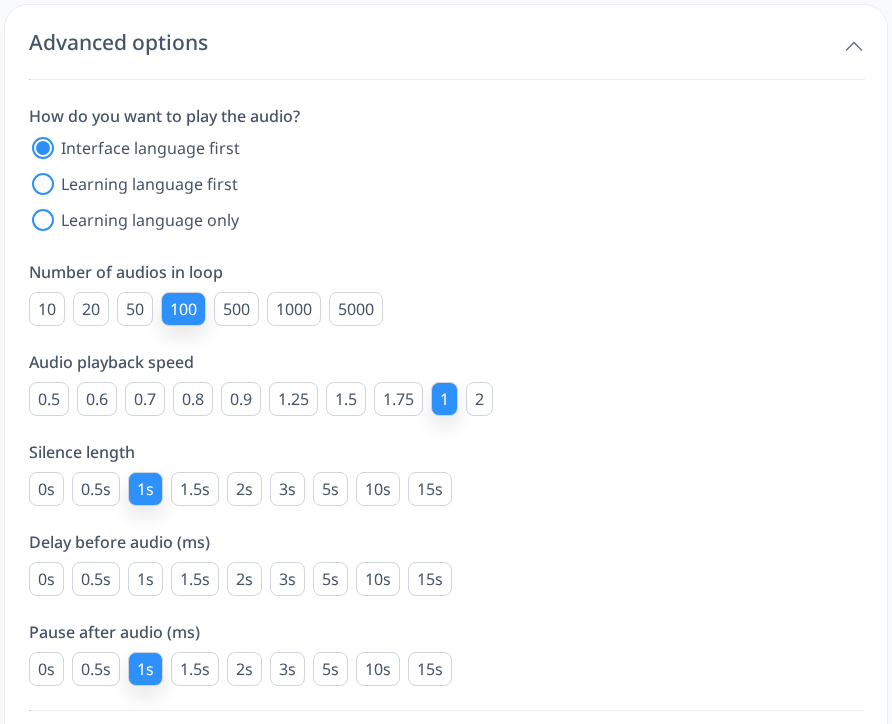
By default, Listen Words and Listen Sentences play your interface (native) language first, followed by your learning language, with a 1-second silence between them. The audio runs at a speed of 1x and loops 100 automatically. However, you can tweak these settings to fit your preferences—whether it’s changing the order, adjusting the speed, modifying the silence duration, or setting a different number of loops.
Playback Order
You can switch the default order to start with your learning language instead, or even play only your learning language without the translation. Choose what works best for how you like to practice.
Audio Playback Speed
Adjust the speed to suit your learning pace. If the default 1x speed feels too fast, slow it down to 0.9x or lower to catch the pronunciation more easily. For a challenge or if you’re comfortable with quicker audio, bump it up to 1.25x or higher.
Silence Length
Control the pause between the translation and the target word or sentence, which is set to 1 second by default. This gives you a moment to recall the meaning before hearing it. Want more time to think? Extend it to 1.5 seconds or longer. Prefer a faster rhythm? Shorten the silence as needed.
Number of Loops
Set how many times the audio repeats. The default is 100, but you can choose 10, 20, 50, 500, 1000 or even 5000, depending on how much repetition you want.
Delay Before Audio
Sets how long to wait between showing a word or sentence in your learning language and playing its audio. The default is no delay. A short delay gives you time to read it and say it yourself before you hear it.
Pause After Audio
Sets the pause after a word or sentence (with its translation) has played, before the next one starts. The default is 1 second.